
The streaming wars continue to intensify, with major media companies launching their own platforms to capture audience attention. Among them, Peacock TV, NBCUniversal’s streaming service, has emerged as a significant player, particularly in the United States. But what exactly is Peacock, why is it so popular, and how does it stack up against the myriad of other streaming options? Let’s dive deep.
What is Peacock TV and Why is it Popular in the USA?
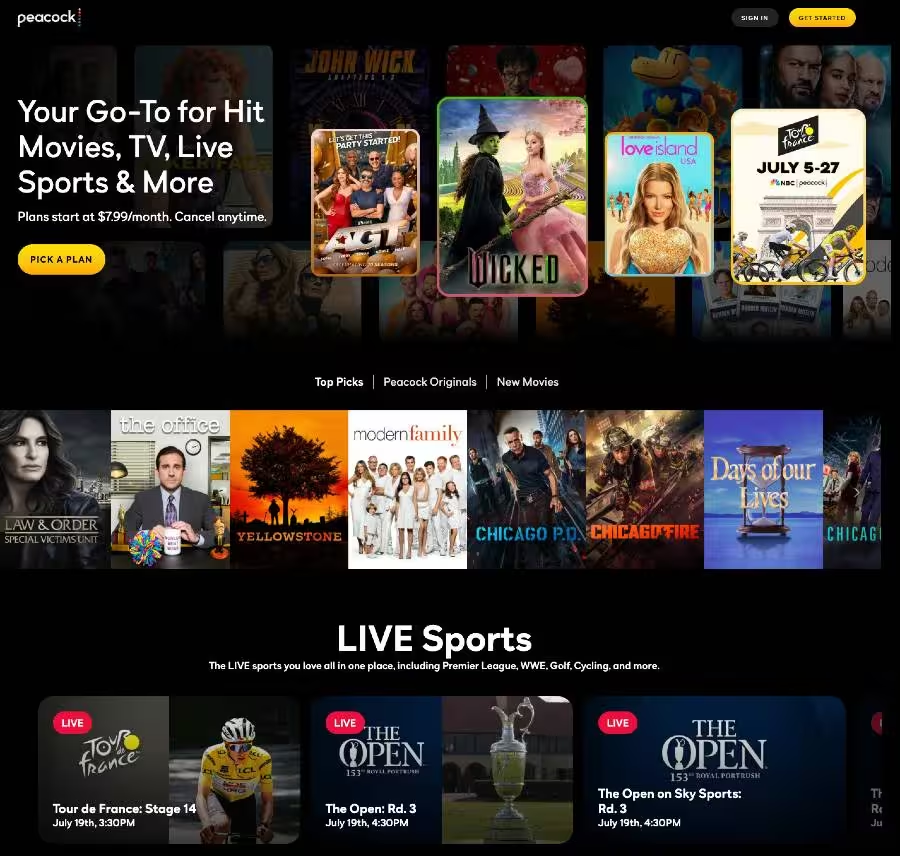
Peacock TV is an over-the-top (OTT) streaming service owned by NBCUniversal, a subsidiary of Comcast Corporation. Launched in July 2020, it offers a diverse library of content, including popular shows, movies, live sports, news, and exclusive originals.
Peacock’s popularity in the USA stems from several key factors:
- Vast Content Library: Peacock leverages NBCUniversal’s extensive catalog, offering beloved shows like The Office, Parks and Recreation, Law & Order franchises, Yellowstone, and current-season NBC hits the day after they air. It also boasts a robust movie collection, drawing from Universal’s film library and other studios.
- Live Sports and Events: A significant draw for many Americans is Peacock’s strong emphasis on live sports. It’s the exclusive streaming home for many Premier League soccer matches, hosts WWE Premium Live Events, and offers extensive coverage of the Olympics, NFL (including Sunday Night Football), PGA TOUR golf, and more. This makes it a must-have for sports enthusiasts.
- Original Programming: Peacock has invested heavily in original content, producing critically acclaimed shows like Poker Face, The Traitors, Ted, and Love Island USA, which have garnered a dedicated following.
- Tiered Pricing Model, Including a Free Tier (Historically): Initially, Peacock stood out by offering a free, ad-supported tier, which allowed users to sample a limited portion of its content without a subscription. While the free tier has largely been phased out for new subscribers, this initial accessibility helped attract a large user base. The current paid tiers remain relatively competitive.
- NBCUniversal Integration: For many US households already familiar with NBC’s broadcast and cable channels (USA Network, Bravo, Syfy, E!), Peacock provides a natural extension, offering on-demand access to their favorite shows and exclusive content.
How to Log In to Your Peacock TV Account
Logging into your Peacock TV account is a straightforward process, whether you’re on a web browser or using the app.
- Go to the Peacock Website or Open the App: Navigate to PeacockTV.com on your computer or launch the Peacock TV app on your smart device.
- Click “Sign In”: You’ll typically find a “Sign In” button in the top right corner of the website or within the app’s main interface.
- Enter Your Credentials: Input the email address and password associated with your Peacock account. Remember that passwords are case-sensitive.
- Click “Sign In” or “Log In”: After entering your details, click the sign-in button to access your account.
Troubleshooting Login Issues with Peacock tv:
- Forgot Password – If you’ve forgotten your password, look for a “Forgot Password?” or “Reset Password” link on the login page. Follow the prompts to reset it via your registered email.
- Forgot Email – If you can’t recall which email address you used, check for any emails from Peacock (e.g., account updates, newsletters) in your various email inboxes. If still stuck, contact Peacock customer support.
- Case Sensitivity – Double-check that you’re entering your password with the correct capitalization.
Why is Peacock Streaming Service Best?
While “best” is subjective, Peacock offers compelling advantages that make it a top contender for many viewers, especially in the US:
- Unrivaled NBCUniversal Content Hub: For fans of NBC, Bravo, USA Network, Syfy, E!, and Telemundo content, Peacock is the ultimate destination, offering next-day access to current shows and an extensive back catalog.
- Robust Live Sports Offering: From Premier League to WWE and NFL, Peacock delivers a strong lineup of live sports that many competitors lack or offer at a higher premium.
- Growing Library of Quality Originals: Peacock’s original programming slate has matured rapidly, with several critically acclaimed and popular series that are exclusive to the platform.
- Competitive Pricing (Even After Recent Hikes): Despite recent price adjustments, Peacock’s Premium tiers still offer significant value, particularly when considering the breadth of content and live sports access.
- User-Friendly Experience: The app and website are generally well-designed, offering intuitive navigation and a visually appealing interface that makes discovering content easy.
- Offline Downloads (Premium Plus): For subscribers of the Premium Plus tier, the ability to download select titles for offline viewing is a convenient feature for on-the-go entertainment.
- Local NBC Channel (Premium Plus): Premium Plus subscribers can stream their local NBC channel live 24/7, a valuable feature for news and live broadcasts.
Is the Peacock TV App Available on App Store or Play Store?
Yes, the Peacock TV app is widely available on major app stores and a variety of streaming devices.
- Apple App Store – You can download the Peacock TV app for iPhone, iPad, and Apple TV. It’s listed under “Peacock TV: Stream TV & Movies.”
- Google Play Store – The Peacock TV app is available for Android smartphones and tablets. Search for “Peacock TV: Stream TV & Movies.”
Beyond mobile devices, Peacock TV is also available on:
- Smart TVs – Samsung, LG, Vizio, Sony, etc.
- Streaming Devices – Roku, Amazon Fire TV, Chromecast, Apple TV, Android TV.
- Gaming Consoles – PlayStation, Xbox.
- Web Browsers – Access directly via PeacockTV.com
How to Create a Peacock TV Account
Creating a Peacock TV account is a simple process:
- Visit the Peacock Website or Open the App: Go to PeacockTV.com or launch the Peacock app on your device.
- Click “Sign Up” or “Get Started”: Look for a prominent button that says “Sign Up,” “Get Started,” or “Create Account.”
- Enter Your Information: You’ll typically be asked for:
- Your email address
- A password (create a strong one!)
- Your first and last name
- Your birth year (to verify age)
- Your ZIP code (for local content and ad targeting)
- Agree to Terms and Conditions: Read through the terms of service and privacy policy, then check the box to agree.
- Choose Your Plan (if applicable): You’ll then be prompted to select a Peacock plan (e.g., Premium, Premium Plus). If you’re looking for a free trial or specific promotions, keep an eye out for those options during this step.
- Enter Payment Information (for paid plans): If you select a paid plan, you’ll need to enter your payment details.
- Start Streaming! Once your account is created and your plan is activated, you can begin exploring Peacock’s content library.
How to Get a Peacock TV Free Trial
While Peacock no longer consistently offers its own direct free trial for its Premium tiers, there are several legitimate ways to potentially access Peacock Premium for free or at a discounted rate:
- Partner Promotions: Peacock frequently partners with other companies to offer free trials or extended free access. Keep an eye out for deals with:
- Internet/Cable Providers: Xfinity (Comcast’s service) often includes Peacock Premium for its internet or cable TV subscribers (e.g., Gigabit speed plans, Xfinity Rewards members).
- Other Subscriptions: Services like Instacart+ sometimes include Peacock Premium as a perk.
- Device Purchases: Samsung Galaxy phone purchases have occasionally offered multi-month free trials.
- Credit Card Rewards: Some credit card rewards programs may allow you to redeem points for streaming service subscriptions or offer cash back on streaming expenses.
- Employee Benefits: Check if your employer offers any discounts or reimbursements for streaming services.
- Hotel Packages: Some hotels might include streaming services like Peacock in their in-room entertainment options.
- Occasional Limited-Time Offers: While rare for direct trials, Peacock may still run specific promotional campaigns around major events (like the Olympics) that could include limited free access.
- Target Circle: Keep an eye on Target Circle offers, as they have occasionally provided free trials for streaming services like Peacock.
Important Note: Always read the terms and conditions of any free trial offer carefully, especially regarding auto-renewal and cancellation policies.
How to Access Peacock TV Outside the USA
Peacock TV’s content library is geo-restricted, meaning it’s primarily available only within the United States and its territories due to licensing agreements. If you try to access Peacock from outside the US, you will typically be blocked.
However, a common method used by individuals to access geo-restricted content is through a Virtual Private Network (VPN).
How to Access Peacock TV Outside USA using a VPN:
- Choose a Reputable VPN Service – Select a VPN known for its ability to bypass geo-restrictions and offer fast US servers. Popular choices include:
- NordVPN: Often praised for its speed and wide range of US servers.
- ExpressVPN: Known for its reliability and strong unblocking capabilities.
- Surfshark: A budget-friendly option with unlimited simultaneous connections.
- CyberGhost VPN: Offers optimized servers for streaming.
- Subscribe and Install the VPN App – Sign up for your chosen VPN service and download its application to your device (computer, smartphone, tablet, smart TV, router).
- Connect to a US Server – Open the VPN app and connect to a server located within the United States. This will mask your actual IP address and make it appear as if you are Browse from the US.
- Clear Browser Cache/Cookies – Before accessing Peacock, it’s often a good idea to clear your browser’s cache and cookies to remove any stored location data.
- Go to PeacockTV.com or Open the App – Now, navigate to the Peacock website or launch the app. You should theoretically be able to access the content as if you were in the US.
Disclaimer: Using a VPN to bypass geo-restrictions might violate the terms of service of streaming platforms. While widely practiced, users should be aware of these terms. VPN performance can also vary, and streaming services constantly work to detect and block VPN usage.
What Are the Peacock TV Packages and Plans?
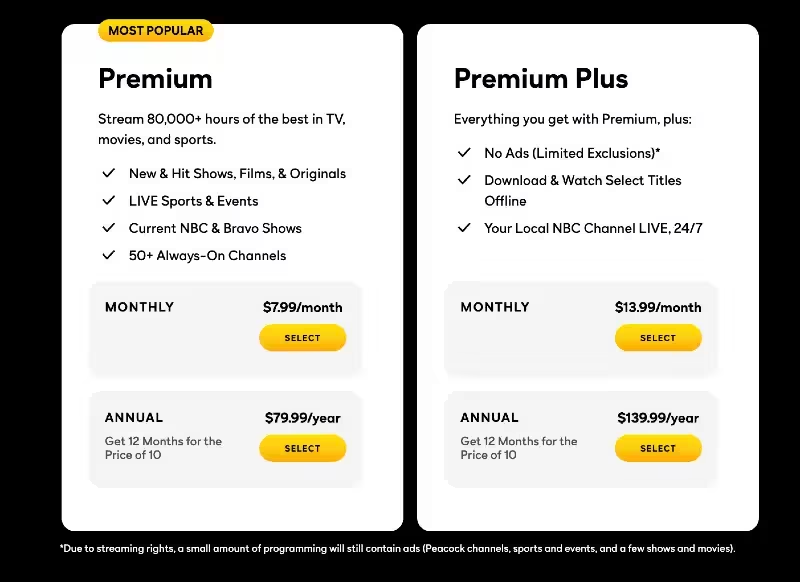
As of July 2025, Peacock TV primarily offers two paid subscription tiers after largely phasing out its free ad-supported tier for new sign-up
| Plan Name | Price (Monthly) | Price (Annually) | Features |
| Peacock Premium | $10.99 | $109.99 | – Access to the full library of 80,000+ hours of movies, TV shows, and originals. – Live Sports & Events (e.g., Premier League, WWE, NFL, Olympics). – Current season NBC & Bravo shows (next-day access). – 50+ Always-On Channels. – Ad-supported (contains commercials). |
| Peacock Premium Plus | $16.99 | $169.99 | – All features of Peacock Premium. – Mostly Ad-Free (some live events and channels may still contain ads due to streaming rights). – Download & Watch Select Titles Offline. – Local NBC Channel LIVE, 24/7. |
Note on “Select” Tier: Peacock is reportedly testing a “Select” tier at $7.99/month or $79.99/year, which would offer current seasons of NBC and Bravo programming and a broad library of titles. This could potentially serve as a new, lower-cost entry point.
Student Discount: Eligible students can often subscribe to Peacock Premium for a discounted rate, such as $2.99/month for 12 months (requires verification).
Is Peacock TV Streaming Expensive?
Peacock’s pricing, even after the recent $3 increase across its plans (effective July 23, 2025), remains competitive within the streaming landscape, though it’s no longer the absolute cheapest ad-supported option.
Comparison with Other Major Streaming Services (Ad-Supported Tiers, approximate monthly prices as of July 2025):
| Streaming Service | Monthly Price (Ad-Supported) |
| Peacock Premium | $10.99 |
| Netflix (Basic w/ ads) | $6.99 – $7.99 (Varies) |
| Hulu (w/ ads) | $9.99 |
| Max (w/ ads) | $9.99 |
| Disney+ (w/ ads) | $7.99 |
| Paramount+ (Essential) | $7.99 |
| Apple TV+ | $9.99 (Ad-free) |
Analysis:
- No Longer the Cheapest Ad-Supported: With the new $10.99 price point for Peacock Premium, it is now more expensive than the ad-supported tiers of Netflix, Hulu, Max, Disney+, and Paramount+.
- Value Proposition: Despite the price hike, Peacock still offers significant value, especially for sports fans and those who want next-day access to popular NBC and Bravo shows. The inclusion of live sports and unique original content often justifies the cost for its target audience.
- Premium Plus Value: The Premium Plus tier ($16.99/month) offers an almost ad-free experience and offline downloads, which makes it a strong contender against ad-free tiers of other services, some of which are priced higher.
Ultimately, whether Peacock is “expensive” depends on individual viewing habits and content preferences. For those who utilize its unique offerings, particularly live sports and NBCUniversal’s specific library, it can still be seen as a cost-effective choice.
What Are the Best Peacock TV Alternatives (Paid)?
If Peacock doesn’t quite fit your streaming needs, or if you’re looking to diversify your streaming portfolio, there are many excellent paid alternatives:
1. Hulu
Hulu is a powerhouse, especially for those looking to replace traditional cable TV. Hulu is renowned for its next-day access to current season episodes from major broadcast networks like ABC, Fox, and FX, which is a significant draw for many. It also boasts an extensive library of classic TV shows, a growing collection of critically acclaimed Hulu Originals (The Handmaid’s Tale, Only Murders in the Building, The Bear), and a diverse movie catalog.
Hulu + Live TV offers over 95 live channels, including major networks, sports channels, and popular cable channels, making it a comprehensive cord-cutting solution.
Pricing (Approximate as of July 2025):
- Hulu (with ads): $9.99/month or $99.99/year
- Hulu (no ads): $18.99/month
- Hulu + Live TV (with ads, includes Disney+ with ads & ESPN+ with ads): $82.99/month
- Hulu + Live TV (no ads, includes Disney+ no ads & ESPN+ with ads): $95.99/month
Best for – Viewers who prioritize current season network TV shows, a strong on-demand library, and potentially a robust live TV experience to replace cable.
2. Max (formerly HBO Max)
Max is a premium destination for high-quality, prestige content. Max offers an unparalleled collection of content from HBO (House of the Dragon, The Last of Us, Succession), Warner Bros. films (often available shortly after theatrical release), the DC Universe, and a vast array of programming from Discovery’s brands (Discovery Channel, TLC, HGTV, Food Network, etc.). It also produces its own Max Originals.
Pricing (Approximate as of July 2025):
- Max (with ads): $9.99/month or $99.99/year
- Max Standard (ad-free, Full HD, 30 downloads, 2 concurrent streams): $16.99/month or $169.99/year
- Max Premium (ad-free, 4K UHD, Dolby Atmos, 100 downloads, 4 concurrent streams): $20.99/month or $209.99/year
Best for – Viewers seeking prestige dramas, blockbuster movies, extensive reality and documentary content, and a premium viewing experience.
3. Netflix
The pioneer of streaming, Netflix remains a global giant with a massive and constantly evolving library. Netflix is famous for its vast and diverse library of original content across all genres, including highly popular series (Stranger Things, Bridgerton, Wednesday, The Crown), films, documentaries, and stand-up specials. It also licenses a rotating selection of third-party movies and TV shows.
Pricing (Approximate as of July 2025):
- Standard with Ads: $7.99/month (Full HD, 2 concurrent streams)
- Standard (ad-free): $17.99/month (Full HD, 2 concurrent streams, downloads)
- Premium (ad-free): $24.99/month (4K Ultra HD, HDR, Dolby Atmos, 4 concurrent streams, more downloads)
Best for – Binge-watchers and those who desire a constant influx of new and original content from around the world, across a wide variety of genres.
4. Disney+
The family-friendly powerhouse from the Walt Disney Company. Disney+ is the exclusive streaming home for content from Disney, Pixar, Marvel, Star Wars, and National Geographic. This includes classic animated films, Disney Channel series, Marvel Cinematic Universe movies and series, Star Wars sagas and spin-offs (The Mandalorian), and nature documentaries. It also has a “Hulu Hub” with a limited selection of Hulu content (full access with the bundle).
Pricing (Approximate as of July 2025):
- Disney+ Basic (with ads): $7.99/month or $99.99/year
- Disney+ Premium (no ads): $15.99/month or $159.99/year
- Bundles: Often offered with Hulu and/or ESPN+ for a discounted price. For example, Disney+, Hulu, ESPN+ Bundle Basic (with ads) for $16.99/month.
Best for – Families, children, and fans of Disney, Marvel, Star Wars, and Pixar franchises.
5. Paramount+
Paramount+ leverages the extensive content library of Paramount Global. Offers a mix of content from CBS (including live NFL games), Paramount Pictures (new movie releases often stream here after theatrical runs), Nickelodeon, Comedy Central, MTV, BET, and Showtime (integrated into the Premium tier). It’s also home to popular originals like the Yellowstone universe spin-offs (1883, 1923) and new Star Trek series.
Pricing (Approximate as of July 2025):
- Paramount+ Essential (with ads): $7.99/month or $79.99/year (includes live NFL on CBS, but no local CBS channel live stream)
- Paramount+ Premium (ad-free): $12.99/month or $129.99/year (includes Showtime content, live local CBS channel, and downloads)
Best for – Fans of CBS network shows, Nickelodeon content, live NFL on CBS, and the Yellowstone and Star Trek franchises.
6. ESPN+
A dedicated streaming service for sports enthusiasts from the ESPN brand. ESPN+ offers a significant amount of live sports not available on ESPN’s linear channels, including exclusive UFC Fight Nights and PPV events (additional cost), out-of-market NHL games, PGA TOUR golf, college sports, international soccer (LaLiga, Bundesliga), and Grand Slam tennis. It also features a vast library of ESPN original series and documentaries (including the acclaimed 30 for 30 series).
Pricing (Approximate as of July 2025):
- ESPN+: $11.99/month or $119.99/year
- Bundles: Frequently included in the Disney Bundle (Disney+, Hulu, ESPN+). Note that a separate, more expensive “ESPN” standalone streaming service is expected to launch later in 2025, distinct from ESPN+.
Best for: Dedicated sports fans, particularly those interested in UFC, NHL, college sports, and a wide variety of less mainstream sports coverage.
7. Apple TV+
Apple’s foray into original content, known for its focus on quality over quantity. Exclusively features Apple Originals, including critically acclaimed and award-winning series (Ted Lasso, Severance, The Morning Show, Pachinko), movies, and documentaries. All content is ad-free and available in 4K HDR.
Pricing (Approximate as of July 2025): $9.99/month (often includes extended free trials with Apple device purchases, or as part of the Apple One bundle).
Best for – Viewers who prioritize high-quality, prestige original programming with an entirely ad-free experience and top-tier technical specifications.
Choosing the Right Alternative
- The “best” alternative to Peacock TV depends entirely on your personal preferences:
- For Broad Entertainment & Next-Day TV: Hulu
- For Prestige Dramas & Blockbusters: Max
- For Diverse Originals & Binge-Watching: Netflix
- For Family-Friendly Content & Major Franchises: Disney+
- For CBS/Paramount Content & Live NFL: Paramount+
- For Exclusive Live Sports: ESPN+
- For High-Quality, Ad-Free Originals: Apple TV+
What Are the Best Peacock TV Free Alternatives?
While free streaming services typically come with ads and a more limited content library compared to paid subscriptions, several excellent options offer a surprising amount of movies and TV shows without a monthly fee:
-
Tubi
Often dubbed “the free Netflix,” Tubi boasts a massive on-demand library with thousands of movies and TV shows. It excels in offering a diverse range of content, from cult classics and B-movies to popular studio films and TV series that might not be available on major subscription services. Tubi also has its own “Tubi Originals.”
Movies across all genres (horror, action, comedy, drama), older TV series, and niche content.
Key Features:
- No sign-up or credit card required to start watching.
- Available on almost all streaming devices, smart TVs, and web browsers.
- Regularly refreshed content.
Best Fit For- Movie buffs, those looking for hidden gems, and viewers who appreciate a vast and eclectic on-demand library without a subscription.
2. Pluto TV
A pioneer in the FAST space, Pluto TV offers a traditional “live TV” experience with hundreds of always-on, curated channels. These channels cover a wide array of genres, from movies and TV shows (often dedicated channels for single shows like Baywatch or Cops) to news, sports, and niche interests. It also has a significant on-demand library.
Channel surfing experience, classic TV shows, movies, news channels (including local news), and themed channels.
Key Features:
- Over 250 live channels.
- No sign-up required.
- Available on a vast range of devices.
Best Fit For – Viewers who miss the traditional cable TV experience and enjoy channel surfing, or those looking for specific themed channels.
3. Amazon Freevee (formerly IMDb TV)
Backed by Amazon, Freevee offers a high-quality selection of movies and TV shows, including some exclusive original series and spin-offs from popular Prime Video shows (e.g., Bosch: Legacy). The content quality is generally higher than many other free services.
Popular movies, well-known TV series, and exclusive originals.
Key Features:
- Integrated into the Amazon ecosystem (Prime Video app, Fire TV).
- Available as a standalone app on various devices.
- Curated selection with a focus on quality.
Best Fit For – Those already in the Amazon ecosystem, or viewers looking for a more curated selection of free content, including some original programming.
4. The Roku Channel
While primarily associated with Roku devices, The Roku Channel is available on various platforms. It offers a large library of free movies, TV shows, and live linear channels, including content from major studios. It also gained a significant boost by acquiring the entire library of short-form content from the defunct Quibi.
Diverse movies and TV shows, including some Roku Originals, and a growing selection of live channels.
Key Features:
- Intuitive interface.
- Available on Roku devices, web browsers, and other smart TVs/devices.
Best Fit For – Roku device owners, but also a strong general option for anyone seeking a broad free content library.
5. Plex
Traditionally known as a media server for organizing personal media libraries, Plex has evolved into a robust free streaming service. It offers over 600 free live TV channels and a substantial on-demand library of movies and TV shows, including content from major studios.
A wide variety of live channels (news, sports, entertainment), movies, and TV shows.
Key Features:
- Combines personal media management with free streaming.
- Excellent interface and discoverability.
- Available globally on most devices.
Best Fit For – Users who want to combine their personal media collection with a comprehensive free streaming experience, including live TV.
6. Crackle
One of the original free streaming services, Crackle offers a curated collection of movies and TV shows. It often features cult classics, older Hollywood films, and some original programming.
Classic movies, older TV series, and some original content.
Key Features:
- No account required to watch.
- Available on most devices.
Best Fit For – Fans of classic cinema and those looking for a straightforward, no-frills free streaming experience.
7. Library-Based Services (Kanopy & Hoopla)
These services are unique because they are ad-free and accessible for free with a valid public library card or university ID. They offer a curated selection of movies, documentaries, independent films, and even educational content. Hoopla also includes e-books, audiobooks, and music.
Thought-provoking films, documentaries, classic cinema, educational content. Hoopla has a broader range including popular movies and TV shows.
Key Features:
- Completely ad-free.
- High-quality and often niche content.
- “Check-out” model similar to physical library items (limited number of views per month).
Best Fit For – Avid readers, documentary lovers, and cinephiles who want high-quality, ad-free content and have a participating library membership.
8. The CW
The CW’s dedicated streaming service offers free access to current and past seasons of CW network shows (e.g., All American, Walker).
Teen dramas, superhero series, and other CW network programming.
Key Features:
- New episodes often available the day after airing.
- No subscription required.
Best Fit For – Fans of The CW’s specific programming lineup.
| Platform | Primary Focus | Content Type | Ads | Sign-Up Required? | Key Differentiator |
| Tubi | On-Demand Movies & TV Shows | Movies, TV series (varied) | Yes | No | Massive, diverse library, “free Netflix” |
| Pluto TV | Live Linear Channels | Live TV, On-Demand | Yes | No | “Cable-like” experience with themed channels |
| Amazon Freevee | Popular Movies, TV, Originals | Movies, TV series, Originals | Yes | Optional | Quality content, some exclusive originals, Amazon integration |
| The Roku Channel | Movies, TV, Live Channels, Originals | Movies, TV series, Live TV | Yes | Optional | Broad content mix, strong for Roku users |
| Plex | Personal Media Server + Streaming | Live TV, On-Demand | Yes | Optional | Combines personal media with free streaming |
| Crackle | Classic Movies & TV Shows | Movies, TV series | Yes | No | Long-standing free service, cult classics |
| Kanopy & Hoopla | Curated, Educational, Indie Films | Movies, Docs, Indies | No | Yes (Library Card) | Ad-free, high-quality, linked to public libraries |
| The CW | Current & Past CW Shows | TV series | Yes | No | Free access to The CW network’s programming |
When exploring free alternatives, remember that the content rotates frequently, and the ad load can sometimes be significant. However, for cost-conscious viewers, these platforms offer a valuable way to access entertainment without a subscription fee.
While these free alternatives can’t fully replicate the premium, ad-free experience or specific exclusive content of a paid service like Peacock, they offer a tremendous amount of entertainment without costing a penny. They are excellent options for supplementing a paid subscription or for those looking to cut costs entirely.
Also read:-
- Is CrackStreams Safe? 10 CrackStreams Alternatives & Good Viewing Experience Tips
- Top 10 Best 123Movies Alternatives – Safe & Legal Movie Streaming
- Top 10 Best StreamEast Alternatives for 2025 – Safe & Legal Sports Streaming
- 10 Best Sportsurge Alternatives for Safe & Smooth Sports Streaming
- 10 Best Methstreams Alternatives 2025 – Safe & Legal